
.svg)
.svg)
ONESHIELD ENTERPRISE / INSURANCE CONTENT
Start from a working product, not a blank definition
OneShield Enterprise includes pre-built products, ISO content, workflows, and rules across 60+ commercial, personal, and specialty lines. Open any of them in OneShield Designer, change what your book requires, and file it.
Content That Ships With the Platform
Pre-built products across 60+ commercial, personal, and specialty lines
ISO content for six commercial lines, with ERC integration for rating
Base use cases covering the policy, billing, and claims lifecycle
One product definition spanning policy, billing, and claims together
Configured in OneShield Designer by business and technical users alike
Pre-Built Products and ISO Content
Five layers, from the products you can start from through the controls that let you change them. All of it opens in OneShield Designer and is modified by your team rather than requested from ours.
Pre-Built Products
Products You Can Start From
Sixteen products ship configured and ready to modify, across commercial package lines, professional and management liability, and personal lines. Each arrives as a complete definition rather than a template you populate.
Key capabilities:
.svg)
Business Owners Package, Commercial Auto, Commercial Crime, and Commercial Florist
Commercial Umbrella, Condominium Association, General Liability, and Cyber
Directors and Officers, Errors and Omissions, and Lawyers Professional
Homeowners, Personal Auto, Personal Umbrella, and Pet Insurance
Workers Compensation, with NCCI rate consumption
Any product copyable as the starting point for a new one
ISO Content
ISO Content for Six Commercial Lines
Commercial lines built on ISO content arrive with ISO forms, rules, and rating already in place, connected to Verisk Electronic Rating Content so premium calculation runs on current bureau data.
Key capabilities:
Commercial Auto and Commercial General Liability
Commercial Property and Commercial Package
Commercial Inland Marine and Commercial Crime
ISO Electronic Rating Content integration for premium calculation
Form attachment rules and statistical codes configured per line
ISO circulars monitored and tracked so changes reach you as they publish
Filings and Jurisdictions
Manage Filings by Date and State
Filings control which version of a product is in force, where, and from when. Your deviations from the base content are tracked as deviations, so a later update does not overwrite the work you filed.
Key capabilities:
Filings managed by effective date and jurisdiction
Deviations from ISO or base content tracked against the original
Program variations and tiering configured per product
Coverage eligibility varying by product
Premium determination and earning methods varying by coverage or program
Rules and Validation
Catch Mistakes Before They Ship
Validation and eligibility rules run against the product definition itself, so a misconfigured coverage surfaces in Designer rather than in production.
Key capabilities:
Validation rules set at coverage or policy level
Required data delineated separately for quote and for policy
Coverage eligibility rules enforced by product
Automated testing across product changes before release
Rate tables imported and exported through Excel for review
One Product Definition
Define It Once, Across Three Modules
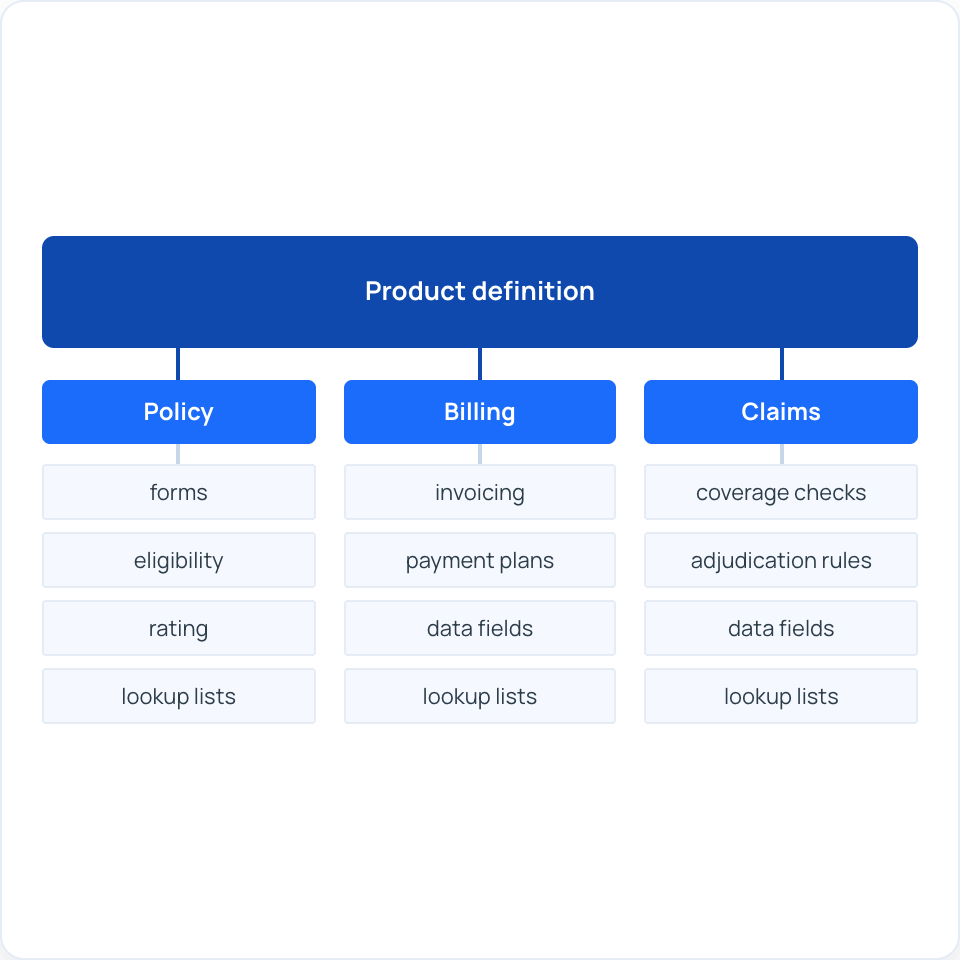
A product definition can integrate policy, billing, and claims rather than being maintained separately in each. What you configure once is what all three run on.
Key capabilities:
Policy, billing, and claims combined into a single product definition
Forms management with attachment triggers driven by policy data
Forms filled from data captured in the UI
Supported data types and widgets drawn from a shared library
Lookup lists maintained centrally and reused across the product
Configured in OneShield Designer, with no proprietary scripting language
How the Content Stays Current
Pre-built content is only useful if it keeps up with the bureau and with your own filings. These are the tools that manage that gap.

What-If Analysis
Model a rate, rule, or coverage change before you commit it. See the effect across your book, then decide whether it is worth filing.

ISO ERC Integration
Premium calculation runs on Verisk Electronic Rating Content rather than a hand-built rate table, so bureau rates arrive as content instead of a development ticket.

Form Attachment Rules and Stat Codes
Forms attach based on policy data, jurisdiction, line, and class code, with statistical codes carried through to reporting. Both are configured, not coded.

Premium Development
Rating and premium logic delivered configured for supported lines, then edited by coverage or program rather than rebuilt from a specification.

Automated Testing
A testing toolset validates product changes before they reach production, so a rate or forms change is verified rather than assumed.

ISO Circular Monitoring
OneShield tracks ISO circulars internally and assesses what each one changes, so an update reaches you as a reviewed change rather than a notice you have to chase.
Frequently Asked Questions
Still deciding whether pre-built content fits your book? Ask us directly.
What is pre-built insurance content?
.svg)

Pre-built insurance content is a working insurance product delivered configured rather than specified: the data model, coverages, rating structure, forms logic, workflows, and business rules for a given line. In OneShield Enterprise it covers pre-built products across commercial, personal, and specialty lines, ISO content for six commercial lines, and a library of base use cases spanning the policy, billing, and claims lifecycle. All of it opens in OneShield Designer and can be changed by your team.
Which products does OneShield deliver pre-built?
Sixteen products ship configured and ready to modify: Business Owners Package, Commercial Auto, Commercial Crime, Commercial Florist, Commercial Umbrella, Condominium Association, Cyber, Directors and Officers, Errors and Omissions, General Liability, Homeowners, Lawyers Professional, Pet Insurance, Personal Auto, Personal Umbrella, and Workers Compensation. Beyond those, OneShield Enterprise supports 60+ commercial, personal, and specialty lines, with pre-configurations available for most and proprietary rates supported throughout.
What ISO content does OneShield Enterprise include?
ISO content is available for six commercial lines: Commercial Auto, Commercial General Liability, Commercial Property, Commercial Package, Commercial Inland Marine, and Commercial Crime. Each arrives with ISO forms, form attachment rules, statistical codes, and premium development in place. Rating runs through integration with Verisk Electronic Rating Content rather than a manually maintained rate table, and OneShield holds a contract with Verisk to support ISO ERC.
What happens when ISO publishes an update?
OneShield assesses the impact of the new ISO version on the product you are running, updates the base product within contracted service levels, and tells you what changed. You review the new version in OneShield Designer against your current configuration, choose which changes to apply, selectively or all at once, and keep your existing exceptions and deviations intact. The resulting filing is tested in your environment and released to production on your schedule. ISO circulars are monitored and tracked internally so updates surface as they publish.
Can we change a pre-built product, or are we stuck with it as delivered?
Pre-built products are configurations, not fixed templates. Coverages, rating, forms, rules, and workflows are all editable in OneShield Designer, and any product can be copied as the starting point for a new one. More than 90 percent of customer adaptations across OneShield Enterprise are configuration rather than code. Your deviations from a base product are tracked as deviations, so a later update to the base does not overwrite them.
Do we need developers to configure an insurance product?
No. OneShield Designer is a web-based, low-code and no-code tool that does not require a proprietary development or scripting language. With training, business users manage product definitions, rating tables, rules, forms, and UI configuration directly. Rate tables import and export through Excel, and OS Assist, an AI configuration assistant built into Designer, provides step-by-step guidance and configuration best practices. More technical work such as workflow and integration configuration is typically handled by technical staff.
Does one product definition cover policy, billing, and claims?
Yes. Policy, billing, and claims run on a single platform with a single data model, and a product definition can integrate all three value streams rather than being maintained separately per module. Coverage eligibility, premium determination, earning method, forms attachment, and validation rules are all defined once against the product, and billing rules and claims reserving rules are configured in the same tool. There is no re-keying between modules and no integration layer to keep in step.
Start From Something That Works
.svg)
.svg)